
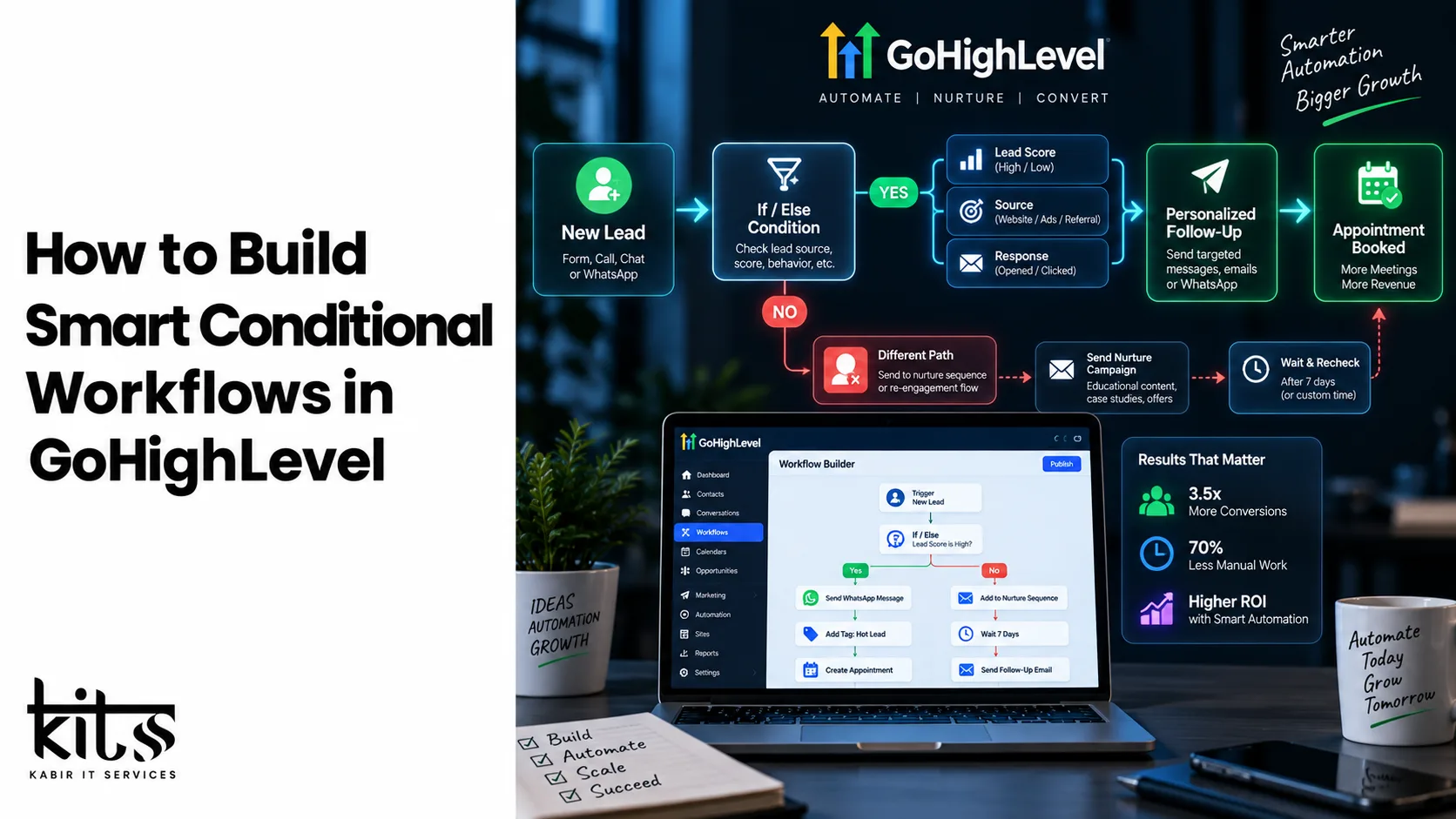
How to Build Smart Conditional Workflows in GoHighLevel
In the competitive world of digital marketing, lead management, and agency growth, generic automated messages are no longer effective. Modern consumers expect personalized experiences tailored precisely to their behavior, preferences, and engagement level. If a prospect fills out a contact form, clicks a link in an email, or books a demo, they should not receive the exact same sequence as a cold lead who hasn’t opened a single message.
This is where Smart Conditional Workflows in GoHighLevel (GHL) transform standard automation into intelligent marketing ecosystems. By leveraging GoHighLevel’s conditional logic (the If/Else engine), you can build dynamic, multi-path automation rules that react in real-time to how leads interact with your business.
In this guide, we will explore how conditional workflows function in GoHighLevel, step-by-step strategies to build smart branches, how custom web development amplifies workflow capabilities, and how kitss can help you deploy enterprise-grade automation systems.
What Are Conditional Workflows in GoHighLevel?
At its core, a conditional workflow is an automated sequence that uses If/Else logic to decision-tree your leads based on specific criteria or actions.
Instead of moving every contact through a linear line (Step A $\rightarrow$ Step B $\rightarrow$ Step C), a conditional workflow asks questions before performing an action:
Has this contact replied to our WhatsApp message?
Is this lead tagged as a “High Intent” buyer?
Did the prospect complete the custom form on our website?
Is the lead located in a specific time zone or geographic region?
Based on the answer (Yes or No), the workflow splits into separate paths, delivering personalized communications, updating pipeline stages, or alerting sales representatives instantly.
                    [ TRIGGER: Form Submission / Webhook ]
                                       │
                                       ▼
                       [ IF / ELSE: Tag = VIP Lead? ]
                                   /       \
                          YES     /         \     NO
                                 /           \
                                ▼             ▼
               [ Fast-Track to Sales Rep ]   [ Send Standard Nurture Sequence ]
                                │             │
                                ▼             ▼
                  [ Direct Call / SMS ]       [ Wait 24 Hours $\rightarrow$ Email ]
Core Elements of GoHighLevel Conditional Logic
To build powerful automated sequences, you must master the fundamental building blocks of GoHighLevel’s workflow engine:
1. Triggers
Triggers are the initial catalysts that pull contacts into a workflow. Examples include:
Form Submitted (Native GHL form or custom web development embedded forms)
Pipeline Stage Changed
Trigger Link Clicked
Contact Tag Added/Removed
Inbound Message Received (SMS, WhatsApp, Email, Meta DM)
2. If/Else Branches
The If/Else action is the decision hub. You can set single conditions or group multiple conditions using AND / OR statements. You can condition based on:
Contact Details: Tag, Custom Field value, City, Email status.
Events & Actions: Replied to message, Opened email, Clicked specific link, Booking confirmed.
Date & Time: Time of day, day of the week, custom date fields (e.g., event date).
3. Smart Delays & Wait Steps
Combining Wait steps with conditional logic prevents overwhelming leads. You can configure Wait steps to hold contacts until:
A specific amount of time passes (e.g., Wait 2 hours).
A specific condition is met (e.g., Wait until contact replies to WhatsApp).
A specific event occurs (e.g., Wait 1 day before appointment time).
Step-by-Step: Building a Smart Lead Nurturing Workflow
Let’s walk through building a high-converting, multi-branch conditional workflow for incoming lead follow-up.
Scenario: High-Intent vs. Low-Intent Lead Routing
Imagine you capture leads via a form on your custom website. You want to prioritize prospects who provide phone numbers and indicate an immediate budget, while nurturing lower-intent leads via email.
[ Step 1: Trigger ]
Contact Fills Website Inquiry Form

[ Step 2: Update CRM ]
Add Contact Tag: "Inbound Lead"
Create Opportunity in Pipeline Stage: "New Lead"

[ Step 3: Add If/Else Condition ]
Condition Name: "Evaluate Lead Priority"

Branch 1: High Priority Criteria
  - Custom Field "Budget" IS GREATER THAN $5,000
  - Phone Number IS NOT EMPTY

Branch 2: Standard Nurture (None of the above match)
Executing Branch 1 (High Priority Leads):
Send WhatsApp / SMS: Send an instant personalized message to book a discovery call.
Assign User: Round-robin assign the lead to a senior sales agent.
Internal Notification: Send a push notification or Slack alert to the assigned sales agent with lead details.
Wait Step: Wait 15 minutes for appointment booking.
Secondary If/Else: Check if appointment was booked. If not, trigger an automated phone call or Voice AI follow-up.
Executing Branch 2 (Standard Nurture Leads):
Send Email: Deliver a helpful guide, video demo, or introductory presentation.
Wait Step: Wait 2 days.
Secondary If/Else: Did they click the video link?
If YES: Add Tag “Engaged Lead”, move to active follow-up branch.
If NO: Send a soft check-in email 3 days later.
Bridging Custom Web Development & GoHighLevel Workflows
While GoHighLevel offers built-in page builders, enterprise businesses and scaling brands often require custom web development (using frameworks like React, Next.js, WordPress, or custom HTML/CSS) to maintain brand precision, lightning-fast page speed, and advanced UX/UI setups.
+-------------------------------------------------------------------------+
|                         CUSTOM WEB FRONTEND                             |
|          (Next.js / WordPress / Custom JS Lead Form)                    |
+------------------------------------+------------------------------------+
                                     |
                                     | Webhook / Custom API Script
                                     v
+-------------------------------------------------------------------------+
|                        GHL API / WEBHOOK CATCHER                        |
+------------------------------------+------------------------------------+
                                     |
                                     v
+-------------------------------------------------------------------------+
|                  GHL SMART CONDITIONAL WORKFLOW                        |
|   1. Parse Custom Data (Budget, Region, User Actions)                  |
|   2. Execute Dynamic Branching Logic                                   |
|   3. Trigger WhatsApp / SMS / Email Response Systems                   |
+-------------------------------------------------------------------------+
How Web Development Powers Advanced GHL Logic:
Custom Form Hook & API Integrations: Custom JavaScript forms on your website can send precise tracking parameters (UTM tags, device types, user behavior patterns) into GoHighLevel custom fields via APIs or Webhooks. Your GHL workflows can then branch based on where the user came from or what pages they visited.
Dynamic UI Changes via Webhook Feedback: When a user completes an action on your website (e.g., making a custom selection in an interactive pricing calculator), custom code can post this data directly into GoHighLevel. The resulting GHL workflow can process the math and return tailored output via WhatsApp or Email instantly.
Webhooks for Two-Way Sync: Combine custom web applications with GHL workflows to trigger real-time user dashboard updates, dynamic user account creation, and personalized portal access upon successful workflow execution.
Elevate Your Automation Architecture with Kitss.tech
Designing, testing, and maintaining complex conditional workflows alongside custom web applications requires deep technical expertise. A single broken condition or misconfigured API webhook can result in lost sales opportunities and poor lead experiences.
This is where kitss.tech delivers immense value.
Who is Kitss.tech?
Kitss.tech is a specialized digital transformation agency that blends high-performance custom web development with advanced marketing automation architecture. Whether you are an agency owner, SaaS founder, or enterprise service provider, kitss.tech designs custom technical infrastructure tailored to your business model.
Specialized Services Offered by Kitss.tech:
Enterprise GoHighLevel Architecture: Building bulletproof conditional workflows, dynamic pipelines, multi-channel automated campaigns (WhatsApp, SMS, Email, Voice AI), and team routing rules.
Custom Web Development: Developing fast, secure, modern websites and web applications tailored for maximal lead conversion and seamless GoHighLevel API/Webhook integration.
API & Custom Integration Engineering: Connecting GoHighLevel with external databases, custom web forms, ERP systems, payment gateways, and bespoke web platforms.
Full-System Audits & Optimization: Reviewing existing GHL sub-accounts, fixing broken workflow logic, eliminating redundant triggers, and optimizing lead speed.
Partnering with kitss.tech ensures your custom website and automated backend workflows work in total harmony—helping you scale revenue without increasing manual workload.
Best Practices for Building Clean Conditional Workflows
To ensure your GoHighLevel workflows remain efficient and scalable, keep these best practices in mind:
Keep Workflows Modular: Avoid creating a single monster workflow with 50+ branches. Instead, split complex logic into smaller, dedicated workflows connected by “Add to Workflow” or “Remove from Workflow” actions.
Always Set Default (Fallback) Branches: Ensure every If/Else step has a clear path for contacts that do not match specific conditions, preventing leads from getting stuck.
Use Explicit Naming Conventions: Rename every step and branch within your workflow builder clearly (e.g.,
If/Else: Has Clicked Demo Link?instead of defaultIf/Else 1).Test Every Branch Thoroughly: Use test contacts to run through each individual path—confirming tag application, SMS delivery, delay timing, and sales notifications work as intended.
Conclusion
Mastering conditional workflows in GoHighLevel transforms your CRM from a simple database into a self-operating sales engine. By leveraging multi-branch logic, tailored outreach schedules, custom web integrations, and expert implementation from specialists like kitss.tech, you can deliver personalized customer journeys at scale and maximize your conversion rates.