
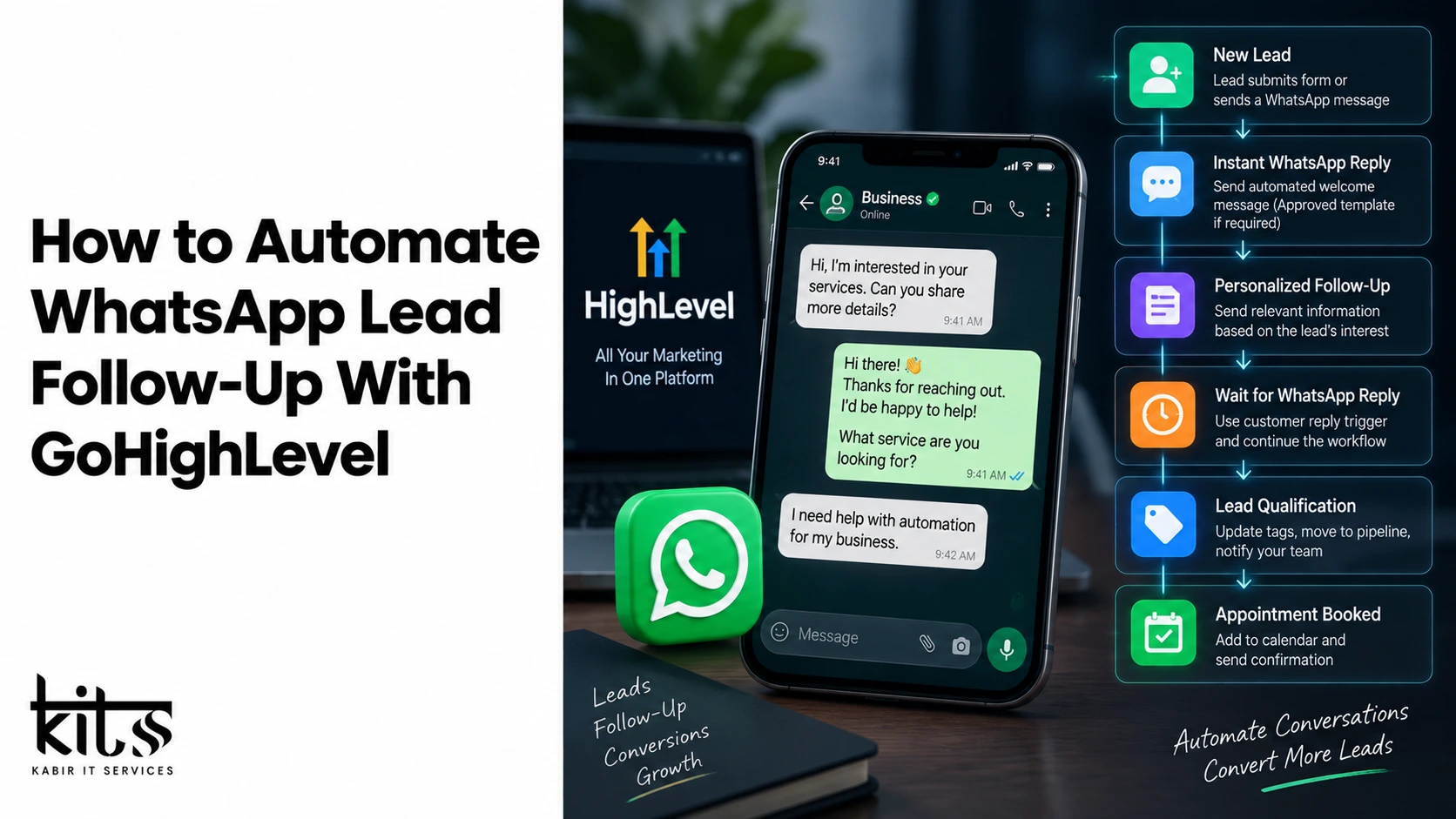
How to Automate WhatsApp Lead Follow-Up With GoHighLevel
In today’s fast-paced digital landscape, speed-to-lead is no longer a luxury—it is an absolute necessity. Businesses spend thousands of dollars driving high-intent traffic through Facebook Ads, Google Ads, and landing pages. However, a massive percentage of these potential clients drop off because traditional email follow-ups go unread, and phone calls are ignored.
Enter WhatsApp automation through GoHighLevel (GHL).
WhatsApp boasts an incredible 98% open rate and a response rate that dwarfs traditional SMS and email combined. When paired with GoHighLevel’s robust workflow engine, you create an unstoppable lead conversion system. In this comprehensive guide, we will walk you through setting up automated WhatsApp follow-ups, integrating custom solutions, and optimizing your sales pipeline for maximum conversion.
Why Choose WhatsApp & GoHighLevel for Follow-Up Automation?
Combining WhatsApp with GoHighLevel bridges the gap between passive lead generation and active sales conversations.
- Instant Gratification: Leads receive confirmation and value within seconds of submitting a form.
- Higher Engagement: Users prefer chatting over messaging platforms they already check dozens of times a day.
- Automated Lead Nurturing: Set up dynamic drip campaigns that trigger based on lead behavior, link clicks, or status updates.
- Centralized Inbox: Manage all incoming messages, phone calls, and social media DMs inside GoHighLevel’s unified conversation stream.
Step 1: Connecting WhatsApp to GoHighLevel
To send automated WhatsApp messages from GoHighLevel, you need an official WhatsApp Business API connection or a verified third-party integration partner.
- Meta Business Verification: Ensure your business entity is verified inside Meta Business Manager to obtain access to the WhatsApp Business API.
- Select an Integration Method: GoHighLevel supports direct API integrations as well as connector tools like Zapier, Make, or custom API gateways.
- Configure the Webhook / Channel: Link your phone number, set up API tokens, and sync your WhatsApp channel inside GoHighLevel Settings under Integrations / Conversations.
- Create Message Templates: WhatsApp requires pre-approved template messages for outreach initiated by the business (outside the active 24-hour customer service window). Draft your templates and submit them for Meta approval.
Step 2: Designing Your Automated Lead Follow-Up Workflow
Once your WhatsApp integration is active, you can build your automated follow-up sequence inside GoHighLevel’s Workflow Builder.
[ Lead Fills Form ]
         │
         ▼
[ Trigger: Form Submitted ]
         │
         ▼
[ Action: Send WhatsApp Message ] ──► ("Hi {{contact.first_name}}, thanks for reaching out!")
         │
         ▼
[ Wait Step: 15 Minutes ]
         │
         ▼
[ Condition: Did Lead Reply? ]
       ├── YES ──► [ Notify Sales Team / Assign User ]
       └── NO  ──► [ Send Follow-Up WhatsApp Question ]
Essential Workflow Triggers & Actions:
- Workflow Trigger: Select
Form Submitted,Facebook Lead Form, orPipeline Stage Changed. - Action – Send WhatsApp: Select your approved WhatsApp template to initiate contact.
- Action – Wait: Add dynamic wait steps (e.g., wait 15 minutes, 1 hour, or 1 day) before sending subsequent nudges.
- Action – If/Else Branching: Check whether the lead responded to your previous message. If they replied, remove them from the automated sequence and alert an active agent.
High-Converting WhatsApp Follow-Up Templates
Here are three plug-and-play WhatsApp templates you can adapt for your GoHighLevel campaigns:
Template 1: The Instant Welcome (Sent immediately after opt-in)
Message: Hi {{contact.first_name}}! 👋 Thank you for requesting information from [Company Name]. We’ve received your details. Would you prefer a quick 5-minute call, or should I send over our detailed catalog right here on WhatsApp?
Template 2: The Value Nudge (Sent 2 hours after no response)
Message: Hey {{contact.first_name}}, I know things get busy! Here is the link to the resource you requested: [Link]. Let me know if you have any questions about how this works for your business.
Template 3: The Re-engagement Check-In (Sent 24 hours later)
Message: Hi {{contact.first_name}}, quick question—are you still looking for help with [Service/Product], or have you already found a solution? Reply YES and I can send over our latest pricing options.
Streamline Implementation with Kitss.tech
Setting up WhatsApp API configurations, meta approvals, custom webhooks, and complex multi-branch GoHighLevel workflows can be technically demanding. That is where kitss.tech comes in.
Kitss.tech specializes in custom digital architecture, advanced automation setups, and technical solutions tailored for agency owners, service providers, and scaling businesses.
How Kitss.tech Enhances Your Automation Setup:
- Custom Integration Setup: Seamlessly connect GoHighLevel with custom WhatsApp API infrastructure, ensuring high delivery rates and reliable message delivery.
- Tailored Workflow Development: Build sophisticated multi-channel campaigns (WhatsApp, SMS, Email, Voice AI) specific to your sales funnel.
- Technical Troubleshooting: Eliminate API errors, meta template rejections, and integration bottlenecks quickly.
- Scale-Ready Infrastructure: Optimize your automation setup to handle thousands of inbound leads daily without performance lag.
If you want to save time, avoid technical errors, and deploy a fully optimized WhatsApp automation pipeline, partnering with experts like kitss.tech ensures your ecosystem runs smoothly from day one.
Best Practices for WhatsApp Lead Automation
To maintain a healthy sender reputation and maximize response rates, adhere to these key practices:
- Obtain Explicit Opt-In: Always include a checkbox on your landing page forms letting users know they consent to receiving messages via WhatsApp.
- Keep Messages Conversational: Avoid overly formal or robotic language. Use short paragraphs, clear spacing, and conversational phrasing.
- Respect Local Business Hours: Use GoHighLevel’s Time Window action to ensure automated messages are only sent during acceptable local daytime hours.
- Monitor Message Metrics: Track open rates, response times, and opt-out rates regularly to refine your copy and workflow timing.
Automating WhatsApp lead follow-ups via GoHighLevel transforms passive leads into active sales conversations effortlessly. By implementing smart workflow triggers, engaging message templates, and robust technical configurations through platforms like kitss.tech, you can scale your operations and boost your conversion rates effectively.