
Abandoned Carts, Lost Sales: How E-commerce Automation Can Bring Customers Back
A customer visits your online store, finds a product they like, adds it to their cart, and moves closer to checkout. Then, without completing the purchase, they leave.
We’ve all been there someone browses your online store, finds something they like, tosses it into their cart, and then drifts away before checking out. You work hard (and spend real money) to bring these shoppers in through ads, SEO, social media, the works. But if people leave before buying? Some of your effort just goes straight down the drain.
Here’s the kicker: on average, over 70% of online shopping carts get abandoned, according to the Baymard Institute’s cart abandonment research. Shoppers walk away for all sorts of reasons unexpected costs, worries about shipping, clunky checkouts. The good news? Not every abandoned cart means you’ve lost a sale for good.
Sometimes people just need a minute or they get distracted, want to compare prices, or have a question about delivery or returns. With the right strategy, you can nudge a bunch of them to come back and finish what they started. That’s what abandoned cart recovery automation is all about.
When you mix personalized email reminders with quick follow-ups on channels like WhatsApp, you make it much easier for people to come back and buy. No need to manually reach out, either you set up the workflow, it jumps into action when someone abandons their cart, and it stops the moment they finish the purchase. Done.
In this guide, we’ll break down how abandoned cart automation really works, why combining email with WhatsApp is so effective, which workflows to set up first, and how you’ll know if your strategy’s actually moving the needle.
What’s Abandoned Cart Recovery, Really?
Abandoned cart recovery means getting shoppers who left items in their carts to come back and buy. Say someone adds a pair of shoes to their cart, then clicks away before paying. Your e-commerce system notes the abandoned cart, and if you’ve got their contact info (and permission), you can trigger a friendly reminder by email, via WhatsApp, whatever makes sense.
If you do it right, your message nudges the customer back, answers any questions they have, and makes it dead simple to finish the purchase.
How Does Cart Recovery Automation Work, Step by Step?
A typical recovery workflow follows these steps:
- A shopper adds products to their cart. The e-commerce platform records the cart activity.
- The shopper leaves without purchasing. The system checks whether the cart meets your abandonment conditions.
- An automated workflow starts. A delay allows time for the shopper to return naturally.
- A personalized email is sent. The message reminds the customer about their selected products and provides a direct checkout link.
- A WhatsApp follow-up may be triggered. Eligible shoppers who have the appropriate messaging permissions can receive a concise reminder or an invitation to ask questions.
- The workflow checks for a purchase. If the customer completes checkout, the remaining recovery messages are stopped.
- Results are tracked. You measure recovered orders, revenue, conversion rates, and messaging costs.
The goal isn’t to send as many reminders as possible. It’s to make the next step easier for customers who still want to buy.
Why Do So Many People Abandon Their Carts?
Before creating a recovery campaign, understand why shoppers leave. The right message depends on the problem you’re trying to solve.
| Reason for abandonment | What the customer may be thinking | How automation can help |
|---|---|---|
| Unexpected shipping costs | “The total is higher than I expected.” | Make shipping information and available delivery options easy to find. |
| Delivery takes too long | “I need this product sooner.” | Share accurate delivery estimates or available shipping options. |
| Checkout is complicated | “I’ll finish this later.” | Send a direct cart link and simplify the checkout process. |
| Questions about the product | “I’m not sure this is right for me.” | Use WhatsApp or customer support to answer product questions. |
| Payment concerns | “Can I trust this store?” | Provide clear payment, security, and return-policy information. |
| Distraction or interruption | “I’ll come back when I have time.” | Send a timely, relevant reminder. |
| Price comparison | “I want to see if I can find a better deal.” | Highlight product value, benefits, and genuine offers where available. |
It’s important to remember that a reminder cannot fix every problem. If customers regularly abandon carts because shipping is too expensive or checkout is confusing, improving the shopping experience may have a greater impact than sending additional messages.
The strongest recovery strategy combines better checkout experiences with well-timed follow-up automation.
7 Ways to Recover More Abandoned Carts with Automation
1. Automated Abandoned Cart Emails
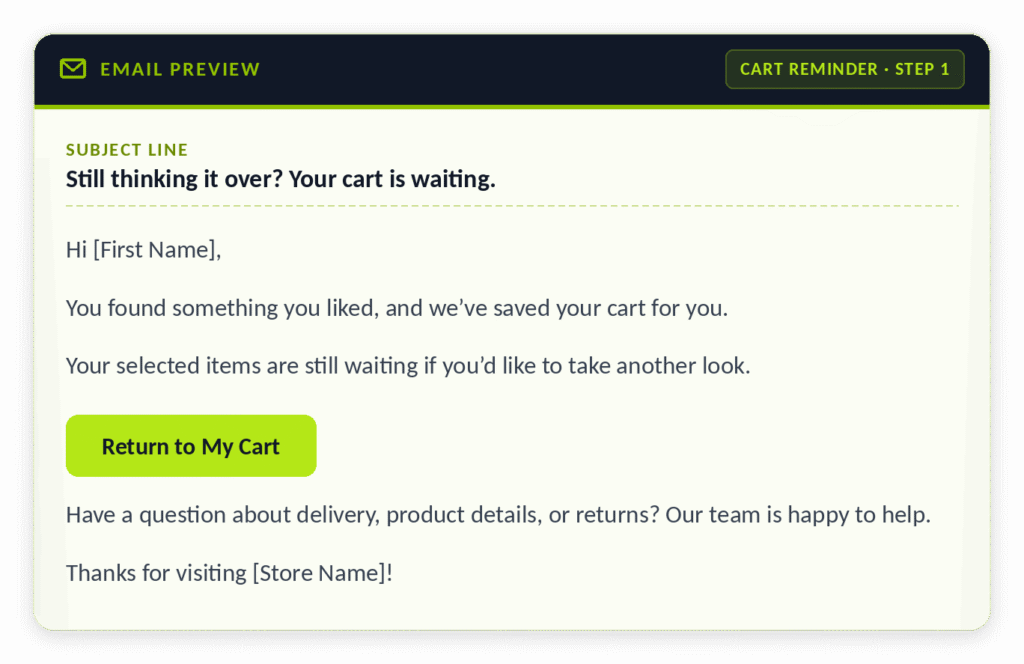
Email’s the first place to start: it gives you space for pictures, details, reassurance, and a nice big “finish your purchase” button. Make your reminders personal show what they added, the color or size, and link them right back to their cart.
Example abandoned cart email
2. WhatsApp Automation
Some folks just prefer quick, back-and-forth conversations. For them, a WhatsApp nudge works better than an email. WhatsApp is personal and immediate, but only use it if your audience is actually there and you’ve got the right permissions.
A good WhatsApp reminder looks like:
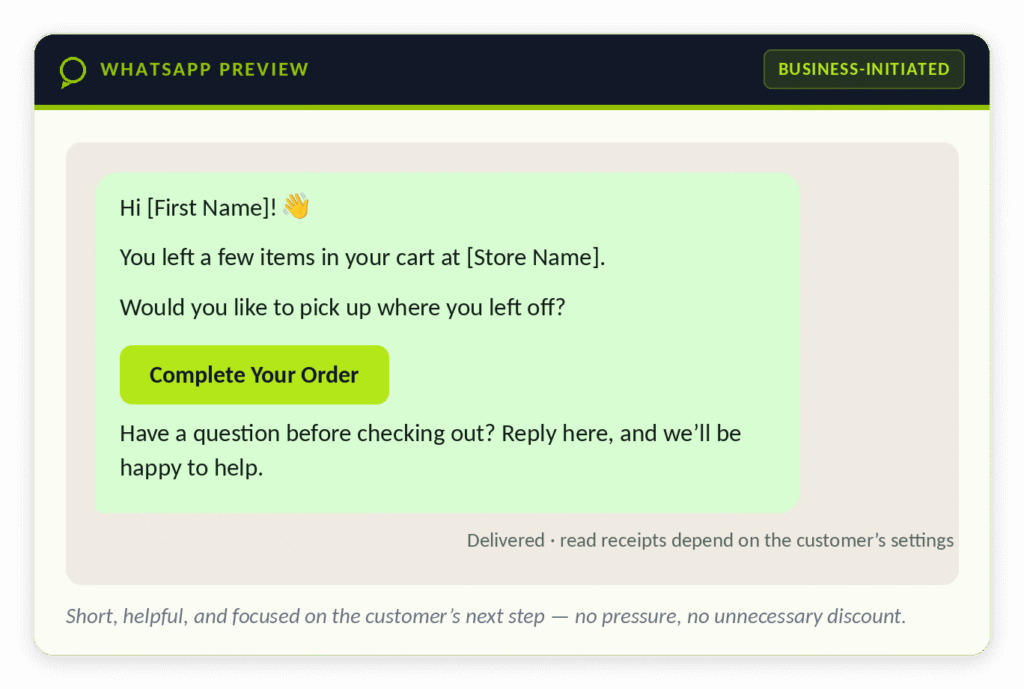
For instance:
- Shopper abandons cart → system checks if it’s a legit case.
- After a delay, send an email.
Still no purchase? If they’re WhatsApp-eligible, send a message there. - If they reply with questions, route them to support.
When they buy, stop the messages.
The workflow follows the customer not the other way around.
4. Personalize Everything
No one likes generic reminders. Use whatever info you have their name, the exact item, maybe even their size or color choice. If you can, show recent purchases or recommend related products. Just be respectful: don’t over-share or use data in a way that feels creepy.
5. Answer Questions Before Checkout
Sometimes, shoppers just need clarity on sizing, return policies, shipping, whatever. If they ask a question (like replying to your WhatsApp), have someone ready (even a decent bot) to answer quickly. If the question’s too complex, hand it over to a human.
6. Test Incentives, But Don’t Give Away the Store
Offering discounts can work, but don’t rely on it for everyone. First, find out *why* people are abandoning. Try clearer info, highlighting product benefits, showing reviews. Save special offers for fence-sitters or groups that actually respond to them. Always check to make sure deals don’t eat up your profits.
7. Retarget with Ads (But Don’t Overdo It)
Some people just won’t answer emails or WhatsApp. If you have the right consent and ad setup, consider retargeting ads to bring them back. Make sure you’re not showing ads to people who recently bought, and cap how often they see them. Compare cost to sales—you want profit, not just clicks.
Email vs. WhatsApp for Abandoned Cart Recovery
Both channels can support cart recovery, but their strengths and requirements are different.
| Feature | Email automation | WhatsApp automation |
|---|---|---|
| Best suited for | Detailed reminders and product information | Short reminders and conversational support |
| Message format | Longer messages, images, product details, and buttons or links | Concise messages, links, and supported interactive formats |
| Customer interaction | Customers can reply, although engagement depends on the email setup | Supports direct two-way conversations with a suitable business messaging setup |
| Automation opportunities | Timed reminders, segmentation, personalization, and follow-up sequences | Eligible reminders, conversational workflows, support routing, and status-based follow-ups |
| Important requirements | Follow applicable email marketing and privacy rules | Follow WhatsApp policies, template requirements where applicable, and relevant laws |
| Potential limitation | Messages may be missed, filtered, or ignored | Not every customer uses WhatsApp or wants business messages there |
There is no single best channel for every store.
For an audience that regularly engages with email, email may be sufficient to start. For customers who prefer messaging and can be contacted compliantly, WhatsApp may add value.
A coordinated strategy can test both while respecting customer preferences and controlling message frequency.
How Email + WhatsApp Recovery Works
Picture an online skincare shop. Someone adds moisturizer and serum to their cart, then disappears.
Here’s how a recovery workflow could help:
Step 1: System logs the abandoned cart and waits a bit.
Step 2: Sends a personalized email with cart contents and a checkout link.
Step 3: If still no action, checks if WhatsApp is an option. If yes, sends a short reminder there.
Step 4: Customer asks if the moisturizer’s good for sensitive skin. Support (human or bot) replies fast.
Step 5: When they buy, all reminders stop. The order’s logged for reporting.
This isn’t just about reminders it’s making shopping easier and support more available.
How to Measure Abandoned Cart Recovery Performance
Sending reminders is only part of the job. You also need to measure whether your automation is helping customers complete purchases.
Track the following metrics:
| Metric | What it tells you |
|---|---|
| Cart abandonment rate | The share of recorded shopping carts that do not lead to purchases, based on your chosen definition. |
| Recovery rate | The share of eligible abandoned carts that subsequently convert within your defined attribution window. |
| Email click-through rate | The percentage of delivered emails that generate clicks, based on your reporting method. |
| WhatsApp engagement | Relevant delivery, read, reply, or click metrics available through your messaging provider. |
| Recovered revenue | Revenue associated with purchases attributed to the recovery workflow. |
| Average order value | The average value of orders attributed to the campaign. |
| Cost per recovered order | Campaign costs divided by recovered orders. |
| Unsubscribe or opt-out rate | How often recipients stop receiving messages through the relevant channel. |
A Simple Abandoned Cart Recovery Example
Suppose your store records 1,000 abandoned carts in a month.
For a simple illustration, assume that 300 carts belong to shoppers who can be contacted through your recovery workflow. If 5% of those 300 carts result in purchases attributed to the campaign, the results would look like this:
| Calculation | Example result |
|---|---|
| Eligible abandoned carts | 300 |
| Assumed recovery rate | 5% |
| Recovered orders | 15 |
| Average order value | $80 |
| Attributed gross revenue | $1,200 |
To understand profitability, calculate the incremental contribution from additional purchases and compare it with the full cost of the recovery program.
Choosing the Right Tools for Abandoned Cart Automation
Picking the right tool depends on stuff like your e-commerce platform, CRM, how customers prefer to be contacted, your budget, and workflow needs. Here are some options worth looking into:
Here are some options to evaluate:
| Tool or platform | Potential role | What to check |
|---|---|---|
| Shopify | E-commerce store and cart-event data | Available abandoned-checkout features, integrations, and plan limitations. |
| Klaviyo | Email marketing and customer segmentation | Current email and WhatsApp capabilities for your region, plan, and integration setup. |
| Omnisend | E-commerce email and marketing automation | Supported channels, platform compatibility, and available recovery triggers. |
| WhatsApp Business Platform | Business messaging and customer conversations | Account setup, approved templates where required, messaging policies, and provider fees. |
| GoHighLevel | CRM, workflows, and connected communication processes | Integration requirements, supported WhatsApp configuration, and e-commerce event availability. |
| Zapier or another integration platform | Connect supported apps and trigger workflows | Available triggers, data mapping, task limits, reliability, and integration costs. |
These tools are not interchangeable, and not every platform supports every part of the workflow natively. Some setups require a third-party integration, a supported messaging provider, or custom development.
Before choosing a tool, confirm its current features, regional availability, pricing, and compatibility with your store.
For businesses looking to connect customer records, messaging channels, and automated workflows, KITSS also offers GoHighLevel services and marketing automation services.
Mistakes to Avoid with Abandoned Cart
Sending Too Many Reminders
Repeated messages across multiple channels can make your business feel intrusive. Define a sensible message limit and stop the sequence when the customer purchases, opts out, or becomes ineligible.
Sending Messages Without Checking Purchase Status
A customer who has completed checkout should not continue receiving reminders to buy the same items. Make purchase confirmation a key exit condition in every recovery workflow.
Treating Every Customer the Same
A first-time shopper may need more product information, while a returning customer may simply need a direct checkout link. Use relevant segmentation without making unsupported assumptions about customer intent.
Ignoring the Actual Checkout Problem
If shoppers leave because shipping costs are unclear, another reminder will not solve the underlying issue. Use analytics and customer feedback to identify and address checkout friction.
Offering Discounts Too Early
Automatically discounting every abandoned cart can reduce margins. Test reminders that explain product value or clarify delivery and return information before assuming that price is the problem.
Ignoring WhatsApp Messaging Requirements
WhatsApp business messaging has specific policy and template requirements. Confirm that your setup is compliant, collect and manage permissions appropriately, and respect customer preferences.
Review the WhatsApp Business messaging policy before launching a campaign, and make sure your messaging platform supports your intended use case.
Failing to Track Revenue and Costs
High email engagement or WhatsApp click rates do not necessarily mean the campaign is profitable. Track completed purchases, costs, returns, and the additional revenue your workflow is likely generating.
How KITSS Can Help with Abandoned Cart
Getting a shopper to come back isn’t just about sending reminders. You need your e-commerce platform, CRM, customer data, messaging channels, and reporting working together.
KITSS makes it easier for businesses to organize customer relationships and automate repetitive follow-ups with CRM and marketing automation.
Depending on what you need and what you already have, your automation might include:
- CRM integration to keep customer records and purchase history organized
- Abandoned cart workflows to trigger follow-ups based on cart and purchase status
- Email automation for personalized reminders and sequences
- WhatsApp integration for direct conversations with customers
- Automating customer support, so FAQs are routed to the right team or flow
- Cross-platform integrations connecting your store, CRM, and marketing tools
- Reporting and optimization to watch recovery rates, spot bottlenecks, and keep improving
What works best depends on your tools, sales process, audience, and preferences. The goal? Build a system that keeps follow-ups consistent, but doesn’t overwhelm shoppers or make things too complicated.
You can explore more about KITSS’s CRM, automation, and digital solutions for growing businesses.
If you want your customer follow-ups to run smoother, KITSS’s marketing automation lets you connect workflows the way your customer journey needs.
Frequently Asked Questions
1. What’s abandoned cart recovery automation?
It’s about using e-commerce triggers, customer data, and automated emails or messages to remind shoppers to finish their purchases. Usual tactics include email, WhatsApp (where allowed), and customer support outreach.
2. How does email automation help?
Emails go out promptly with product info and a direct link back to checkout. Sequences are personalized with cart details, and stop automatically when someone buys or unsubscribes.
3. Can WhatsApp be used for abandoned carts?
Absolutely. Businesses use WhatsApp Business to message shoppers reminders, give support, and help them finish purchases — provided they follow template, privacy, and marketing rules.
4. Which is better, email or WhatsApp?
Neither always wins. Email’s great for detailed info and multi-step sequences. WhatsApp delivers quick reminders and real conversation. Pick what fits your audience and campaign.
5. When should you send reminders?
A business might send the first email an hour after abandonment, another at 24 hours, and maybe a later follow-up. These are just starting points. Let customer response guide your schedule.
6. Should every abandoned cart get email and WhatsApp?
Nope. Let customer preference, behavior, and purchase status decide which messages go out. Coordinating channels avoids unnecessary repeats.
7. Should you always offer a discount?
Not right away. Start by tackling common questions—shipping, returns, product info. If you try a discount, measure if it really boosts profit, not just orders.
8. Which tools automate recovery?
Depending on your setup, Shopify, Klaviyo, Omnisend, GoHighLevel, WhatsApp Business, and connectors like Zapier can play a role. Always check features and costs before jumping in.
9. How do you measure success?
Track recovered orders, recovery rates, attributed revenue, average order value, costs, and opt-outs. Use consistent attribution windows and run tests to see if automation actually increases purchases.
10. Can CRM automation bump up sales?
Yes, if you use it to organize info, coordinate follow-ups, and connect communication channels. The effect depends on your data quality, workflow design, customer experience, and how you measure results.
Final Thoughts: Turning Abandoned Carts Into Customer Wins
Just because someone leaves a cart, doesn’t mean they’re done with you. Sometimes they just need a nudge, clearer info, or a simple answer before buying.
A solid cart recovery plan blends a smooth checkout with timely, personalized messages. Emails fill in the details, WhatsApp keeps it conversational for those who prefer it.
When you sync these channels through CRM and automation, you cut out manual grunt work, stay consistent, and spot chances to improve the buying experience.
Start simple: spot abandoned carts, send a helpful email, add a WhatsApp follow-up where it fits, and stop when the customer buys. Measure and tweak based on what really happens.
Ready to make your follow-ups smarter? Check out Kitss.tech for CRM and automation solutions that help your business run sharper.